



This Product Is Sold By SBUCOMPUTERS To Ask A Question, Click Ask A Question Below
Seller
SBUCOMPUTERS
Description
Once-off purchase.
Full version.
Instant Delivery to your email.
No monthly subscription.
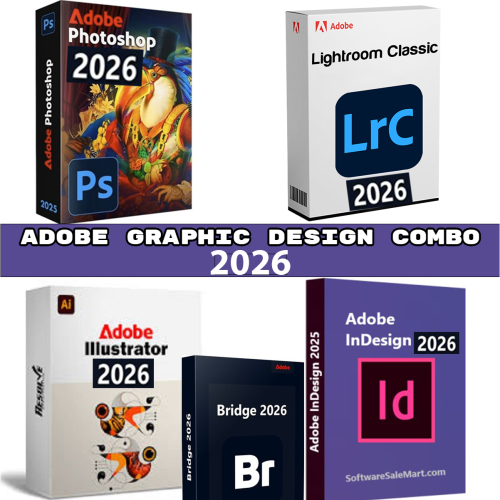
Adobe 2026 Creative Combo (5-in-1 Professional Suite)
Includes the following full desktop applications:
-
Adobe Photoshop 2026
-
Adobe Illustrator 2026
-
Adobe InDesign 2026
-
Adobe Lightroom Classic 2026
-
Adobe Bridge 2026
Experience the power of creativity with the complete Adobe 2026 Design Suite — a professional combo that brings together industry-leading tools for photo editing, illustration, publishing, and digital asset management. Perfect for designers, photographers, marketers, publishers,
1. Adobe Photoshop 2026
Overview:
Photoshop is Adobe’s flagship raster-image editing and compositing application. It’s used for photo editing, digital painting, graphic design, composite images, web graphics, retouching, etc.
New Features (2026):
Some of the big updates in the 2026 version include:
- Smarter background removal & subject selection: The Remove Background and Select Subject tools have been significantly improved in accuracy — now available both as on-device (local) models and cloud models. PhotoshopCAFE
- "Harmonize”: A tool that automatically matches colour, lighting and shadows between layers in a composite so they blend more naturally. PhotoshopCAFE
- New Colour & Vibrance adjustment layer: This adjustment layer now includes Temperature and Tint sliders — letting you do white-balance & tint adjustments directly. Digital Camera World
- Improved workflow, export & collaboration: Better integration with cloud, sharing, and performance enhancements. Adobe Help Center
Uses / Ideal Users:
- Photographers doing heavy retouching/composites
- Graphic designers who mix raster + text + imagery
- Digital artists working with textures, painting and image generation
- Marketing professionals who need to create composite images, banners, web assets
- Anyone needing powerful selection, masking, compositing and up-scaling tools
Sales-Friendly Description:
Unleash your creative vision with Adobe Photoshop 2026. With game-changing AI-powered tools like Harmonize, Generative Upscale and enhanced Background Removal, Photoshop takes compositing and photo editing to a whole new level. Whether you're a pro photographer, designer or digital artist, Photoshop 2026 offers unmatched control, precision and speed — . Upgrade today and bring your wildest ideas to life.
2. Adobe Illustrator 2026
Overview:
Illustrator is Adobe’s core vector-graphics application: creating logos, icons, illustrations, typography, infographics, packaging, and more. The art is scalable and clean, making it perfect for print or digital work.
New Features (2026):
Some of the major enhancements:
- Improved font browser: Better finding, applying and organizing fonts from the Adobe Fonts library (via CC Libraries) inside Illustrator. Adobe Help Center
- Enhanced gradient & colour tools: New support for gradient dithering (to reduce banding) and perceptual interpolation for more natural colour transitions. Adobe Help Center
- Improved artboard management: Lock artboards via right-click, assign background colours, duplicate/rename/export artboards easily. Adobe Help Center
- On-canvas editing real-time performance gains: Smoother, lag-free work even on complex vector scenes. Wikipedia
- New snapping tools: Snap line endpoints to tangents, perpendicular snapping for curves/paths. Adobe Help Center
Uses / Ideal Users:
- Logo and brand identity designers
- Packaging designers and print professionals
- Illustrators creating crisp scalable artwork
- Motion-graphics designers needing vector assets
- UI/UX designers working with icon sets and scalable interface graphics
Sales-Friendly Description:
Meet Adobe Illustrator 2026 — the gold standard in vector graphics design. With enhanced font management, smoother gradients, smarter artboard workflowss, Illustrator empowers you to design beautifully and precisely at any scale. From brand identities and icons to packaging and digital illustration, Illustrator 2026 gives you the tools to create with clarity and flexibility.
3. Adobe InDesign 2026
Overview:
InDesign is Adobe’s industry-leading desktop publishing and page-layout software — used to design everything from brochures, magazines, books, ebooks, interactive PDFs, reports, catalogs, etc.
New Features (2026):
Key updates include:
- Flex Layout: A new layout system that works similarly to CSS Flexbox — create containers and child objects with rules that adapt to content (size auto/fixed, direction, spacing, alignment). Great for responsive or automated layouts. Nousmedis
- GPU-accelerated performance (Windows): Smoother zooming, scrolling, rendering with large/complex documents. Nousmedis
- Math Expressions panel: Create, edit and style math expressions directly in InDesign without external plugins — useful for technical documents. Adobe Help Center
- Cloud collaboration / web text editing: Share documents with editors who can edit via a browser. InDesign Secrets
- Other workflow and automation improvements: Enhanced publishing automation, improved accessibility, and multi-format workflows. Orbit Training
Uses / Ideal Users:
- Publishers and editorial designers (magazines, newspapers)
- Book designers (print + digital ePub)
- Marketing collateral creators (brochures, flyers, catalogs)
- Technical publishing (white-papers, manuals)
- Design teams who need automation, templating, responsive layouts
Sales-Friendly Description:
Elevate your publishing workflow with Adobe InDesign 2026. Featuring the new Flex Layout system for responsive, adaptive document design, GPU-accelerated rendering, built-in math-expression editing and seamless web collaboration, InDesign 2026 is built for modern content creation. Whether you're designing magazines, catalogs, ebooks or interactive PDFs — InDesign gives you the power to deliver professional layouts at scale.
4. Adobe Lightroom Classic 2026
Overview:
Lightroom Classic is Adobe’s professional photo-organizing and editing application aimed at photographers with local/catalog workflows (versus cloud-only Lightroom). It supports RAW editing, large volumes of images, non-destructive edits, tethered capture etc.
New Features (2026):
Some of the standout new features:
- Assisted Culling: Lightroom can analyse a shoot and pick/select the "keepers” (based on eyes open, subject focus, exposure) and reject others. PhotoshopCAFE
- Auto Stack by time/visual similarity: Group similar frames or stack by time to manage large volumes from shoots. PhotoshopCAFE
- Shadow and Reflection detection in Remove tool: Remove tool can detect and remove shadows or reflections automatically. PhotoshopCAFE
- Automatic Dust removal: Detect sensor dust spots and apply fixes automatically. PhotoshopCAFE
- New Colour Profile tools: e.g., the "Color Variance” slider in Point Colour to fine-tune tones. Greg Benz Photo
- 4K Export for slideshows & video: Export slideshows/videos in 4K. PhotoshopCAFE
- Tethered support & performance improvements: Expanded camera tethering (more brands) and faster catalog performance. Adobe Help Center
Uses / Ideal Users:
- Professional photographers managing large photo libraries
- Wedding/portrait photographers needing efficient culling & editing workflows
- Landscape/travel photographers using RAW workflows and tethering
- Photo studios producing exports, slideshows or client galleries
Sales-Friendly Description:
Take control of your photo workflow with Adobe Lightroom Classic 2026. With smart AI-powered Assisted Culling, automatic dust & reflection removal, new colour-fine-tuning tools and 4K export capabilities, Lightroom Classic 2026 is built for pro photographers who demand speed, quality and efficiency. Organise, edit and share your best work with ease from one trusted platform.
5. Adobe Bridge 2026
Overview:
Bridge is Adobe’s digital asset management (DAM) tool: it lets you preview, organise, browse, label, add metadata, batch-rename and export assets (images, video, graphics, raw files) to feed into Adobe apps like Photoshop, InDesign, Illustrator etc.
New Features (2026):
Highlights include:
- Quick Actions via Adobe Express: Bridge supports quick actions (e.g., Remove Background, Trim Video, Convert to SVG/GIF) via Adobe Express integration. Adobe Help Center
- Content Credentials: Metadata that helps protect your assets and embed tamper-evident information about your creative process. Adobe Help Center
- Edit Capture Time / metadata improvements: Change capture time of JPEG/RAW files to correct camera timezone/clock mistakes. Damas Wiki
- Support for more file types: Preview, thumbnail generation, and keywording support for Adobe XD and other formats. Damas Wiki
- Free for everyone (standalone): Bridge 2026 is available as a free standalone download while still integrating with Creative Cloud. ProDesignTools
Uses / Ideal Users:
- Creatives, design teams and studios managing large asset libraries
- Photographers or agencies needing to organise RAW/photos, rate/label, batch-rename or batch-export
- Multi-app workflows (Photoshop+Illustrator+InDesign) where assets need to be managed and shared
- Anyone who needs a visual browser of files with rich metadata + batch export capabilities
Sales-Friendly Description:
Streamline your asset management with Adobe Bridge 2026 – now free for life. View thumbnails, manage metadata, apply batch operations and protect your creative work with embedded Content Credentials. With new integration for quick exports and asset previews across formats, Bridge 2026 makes it easy to organise, find and share your creative assets with confidence.
Summary Table
| Product | Key Strength | Best For |
|---|---|---|
| Photoshop 2026 | Advanced raster editing & compositing with tools | Photographers, digital artists, designers |
| Illustrator 2026 | Vector graphics, scalable art, logos/illustrations | Graphic designers, illustrators, UI/UX designers |
| InDesign 2026 | Layout & publishing for multi-page documents | Publishers, print designers, marketing collaterals |
| Lightroom Classic 2026 | Photo library + RAW editing + efficient workflows | Pro photographers, studios |
| Bridge 2026 | Asset management, metadata, batch export & organisation |
Creative teams, asset managers, studios
|
Rating & Reviews
Based on 0 Ratings
- 5 Star
- 4 Star
- 3 Star
- 2 Star
- 1 Star